Mirasim Documentation
Migrate from Conductor
Import from Conductor in one click: every workspace shows up as a worktree, uncommitted changes included, with its Claude Code and Codex chats ready to continue.
What comes with you
Conductor alternative: move to Mirasim →
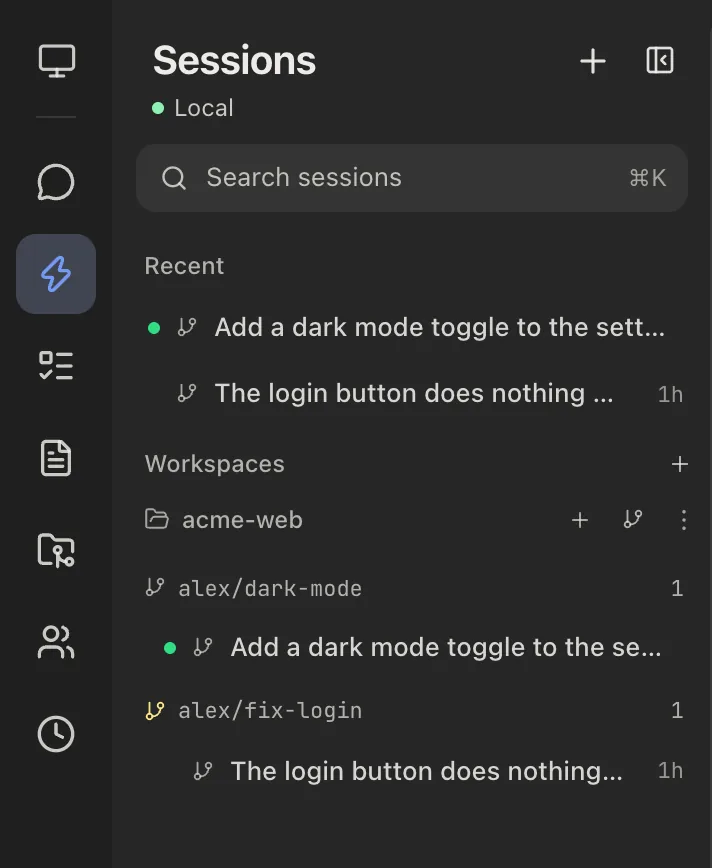
Conductor runs Claude Code and Codex on your Mac, and each Conductor workspace is a Git worktree of your repository on its own branch. Mirasim finds both where they already are. Import once, and your repositories, workspaces, their uncommitted changes and their chats are all in Mirasim, each chat with the title it had in Conductor. Importing only reads: nothing is copied, moved or converted, and Conductor's own files are left alone.
| In Conductor | In Mirasim |
|---|---|
| Workspaces | Listed under the repository, one group per branch. The folders stay where Conductor made them. |
| Uncommitted changes | Still in each worktree, listed on the workspace's Git tab. |
| Claude Code chats | Under their workspace, with the whole history. Send a message to continue the same conversation. |
| Codex chats | The same. On your own Codex account a chat continues in place. On Mirasim credit or another key, Mirasim continues a copy and leaves the original as it was, so it still opens in Codex. |
| Chats run with Cursor | Not carried over. Mirasim doesn't run Cursor. |
| Archived workspaces | Only workspaces still on disk show up. |
| Setup, run and archive scripts; Files to copy | Files to copy and the setup script are used for new worktrees, after Mirasim asks you. Run and archive scripts aren't run. See Setup scripts and .env files below. |
| Checkpoints, diff comments, Conductor settings | Not carried over. |
On Conductor Cloud? Move to your Mac before November 13
Conductor Cloud goes read-only on November 13, 2026: you can still read old chats and export, but not send. On November 20 Conductor starts deleting cloud data. Mirasim picks up what is on your Mac, so move cloud workspaces there first:
- Right-click each cloud workspace you want to keep and choose Transfer to local. Conductor moves the workspace and its chats to your Mac.
- For a full archive of everything, go to Settings › Account › Export data.
Local workspaces have no deadline: the local Conductor app keeps working until it winds down in early 2027.
Move over in four steps
- Install Mirasim and sign in
Download it from mirasim.ai/download and sign in (chapter 1). Conductor came with its own copies of Claude Code and Codex, so they may not be installed on your Mac on their own. If they aren't, Get started installs them; sign in with the account you used in Conductor.
- Import from Conductor
The first time you open Get started, Mirasim finds Conductor on your Mac and offers to import it: press Import. The window lists how many repositories, worktrees and sessions it found, and what it leaves out for now (archived worktrees, sessions of Cursor and other agents). To import again later, right-click Workspaces in the sidebar and choose Import from Conductor…. You need Mirasim 0.0.786 or later.
- Find your workspaces
Each Conductor workspace appears under the repository, named after its branch, with its chats under it. Open the workspace alongside a chat (⇧⌘E) and its Git tab lists the uncommitted changes.
- Open a chat and keep going
Open a chat to read the whole history, then send a message. The agent picks up the same conversation in the same worktree, with everything said before.
git worktree list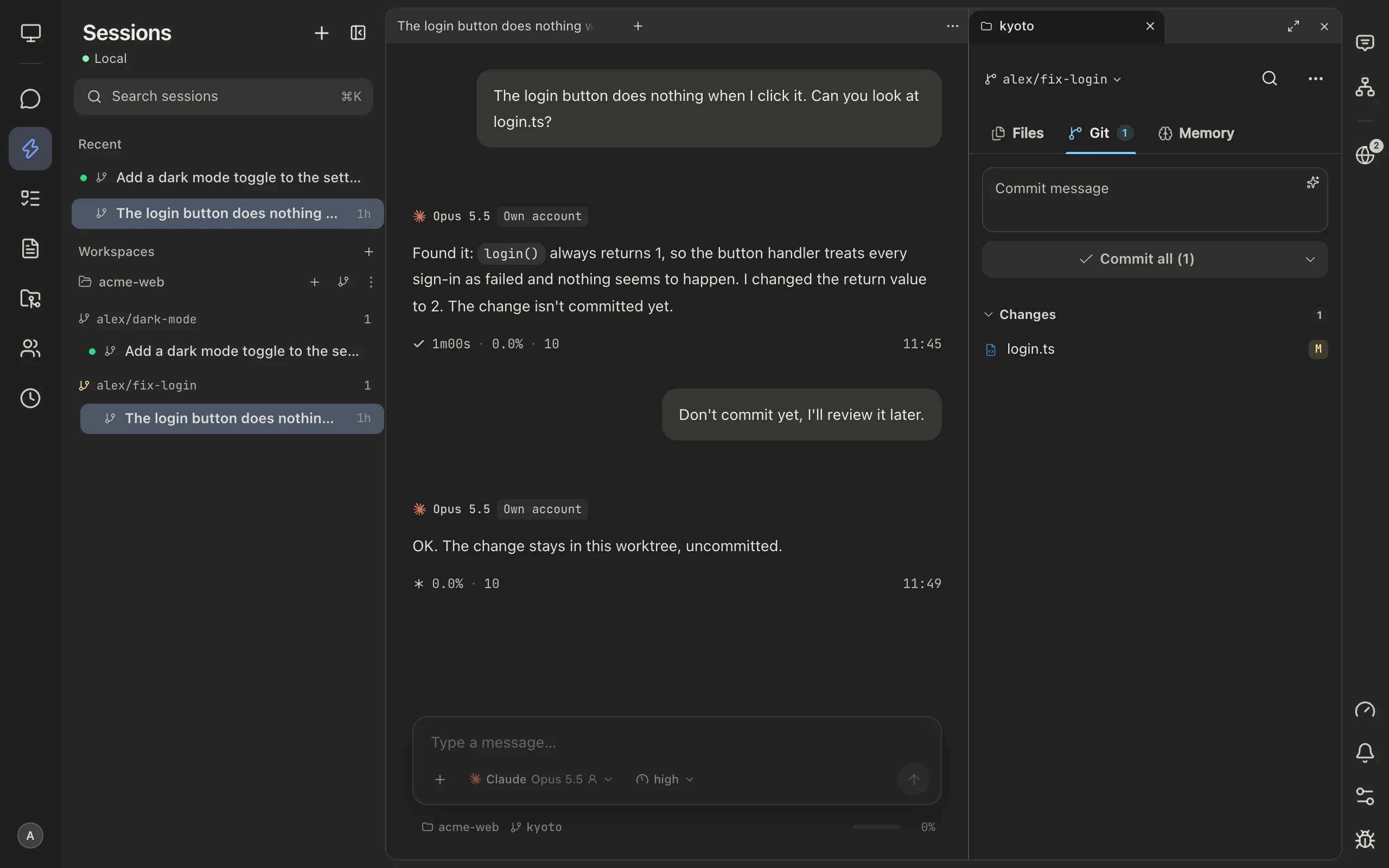
Start new parallel work
For a new task, tick worktree in the composer and pick the base branch. The session gets its own worktree on a new branch, the way a new Conductor workspace did (chapter 8).
To keep working on a branch from Conductor, open its worktree under the repository instead of switching the repository folder to that branch. Git won't check out one branch in two places.
Chapter 8 · Branches, reruns and worktrees › Worktrees: parallel agents on one repository →
Setup scripts and .env files
Conductor can run a setup script in each new workspace, start your app from the Run button, run an archive script, and copy gitignored files such as .env into new workspaces (Files to copy and .worktreeinclude). The workspaces you bring over already have their files. For a new worktree, Mirasim copies the files and runs the setup script too: it reads the repository's .worktreeinclude, or the Files to copy and setup script Conductor keeps for that repository, where they are. The first time, it lists every file and the command and asks you; the setup script runs in the background, so the agent can start right away.
- Tick Do the same for this workspace from now on to stop the question. To change it later, open the workspace's worktree menu and choose Preparing new worktrees…: Ask, Always or Never, and a setup script of your own, which is used before any other tool's.
- Scripts your team keeps only in the repository's .conductor/settings.toml aren't read. Paste the setup command into Setup script in Mirasim there.
- There is no Run button or archive script: start your app in the session's terminal, or ask the agent to.
Where things are now
| In Conductor | In Mirasim |
|---|---|
| New workspace | Tick worktree in the composer and pick a base branch (chapter 8) |
| Diff viewer | The source control panel: a diff for every changed file, staged and unstaged (chapter 11) |
| Commit and push | The source control panel: commit, or commit and push in one step (chapter 11) |
| Checkpoints | Rewind on a message restores the conversation, the code, or both (chapter 8) |
| Routines | Scheduled prompts (chapter 19) |
| iOS app | The phone app on Android, and on iPhone from the App Store (chapter 21) |
| Shared chats with teammates | Turn on Share with members in the session's ⋯ menu, in a collab space (chapter 13) |
| Conductor Cloud | A hosted collab space (chapter 12), or your own computer or server made a collab space (chapter 14) |
Questions
- Is there an import button?
- Yes. The first time Mirasim finds Conductor on your Mac, Get started offers to import; after that, right-click Workspaces in the sidebar and choose Import from Conductor…. Importing adds your repositories and reads Conductor's worktrees and the Claude Code and Codex history where they are. Nothing in Conductor changes, and repositories that are already workspaces aren't added twice.
- Can I keep using Conductor for now?
- Yes. The local app works until early 2027, and Mirasim leaves Conductor's files alone. Just don't send to the same chat from both apps at once.
- Do I have to move before November 20?
- Only Conductor Cloud has a deadline: move cloud workspaces to your Mac before November 13. Local workspaces can move whenever you're ready.
- Some chats don't show up
- Mirasim reads chats from where Claude Code and Codex keep them by default, ~/.claude and ~/.codex. Chats run with Cursor, and chats in workspaces that are no longer on disk, don't show up.
- Does it cost anything?
- Not with your own Claude Code and Codex accounts: the app is free with your own agent accounts and API keys. Hosted team spaces are paid; see the pricing page.
Article · A Conductor alternative for Mac, Windows and Linux → How Mirasim compares with Conductor, and Conductor's shutdown dates.
Something wrong or missing on this page? Tell us